
Installing the BetMexico App gives you instant access to real-time odds, live match streaming, and fast local payments right from your mobile screen within 60 seconds. This guide provides clear instructions on installation procedures, system parameters, feature performance, and simple solutions for frequent setup issues BetMexico.
System Requirements for Downloading the BetMexico App
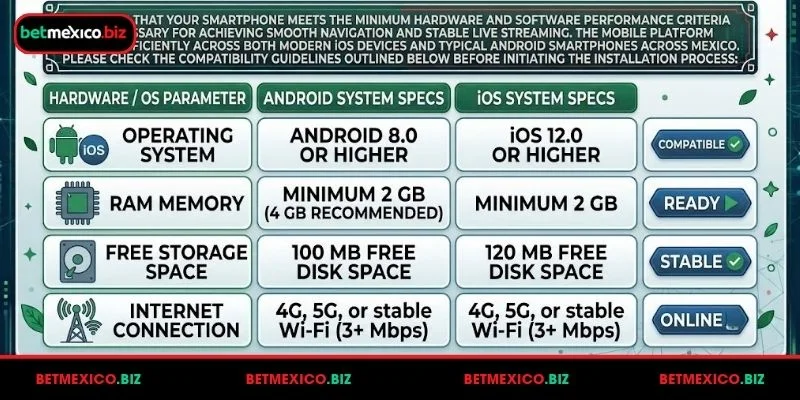
Ensuring that your smartphone meets the minimum hardware and software performance criteria is necessary for achieving smooth navigation and stable live streaming. The mobile platform operates efficiently across both modern iOS devices and typical Android smartphones across Mexico.
System requirements for downloading the BetMexico app
Please check the compatibility guidelines outlined below before initiating the installation process:
| Hardware / OS Parameter | Android System Specs | iOS System Specs |
| Operating System | Android 8.0 or higher | iOS 12.0 or higher |
| RAM Memory | Minimum 2 GB | Minimum 2 GB |
| Free Storage Space | 100 MB free disk space | 120 MB free disk space |
| Internet Connection | 4G, 5G, or stable Wi-Fi (3+ Mbps) | 4G, 5G, or stable Wi-Fi (3+ Mbps) |
Guide to Installing the BetMexico App
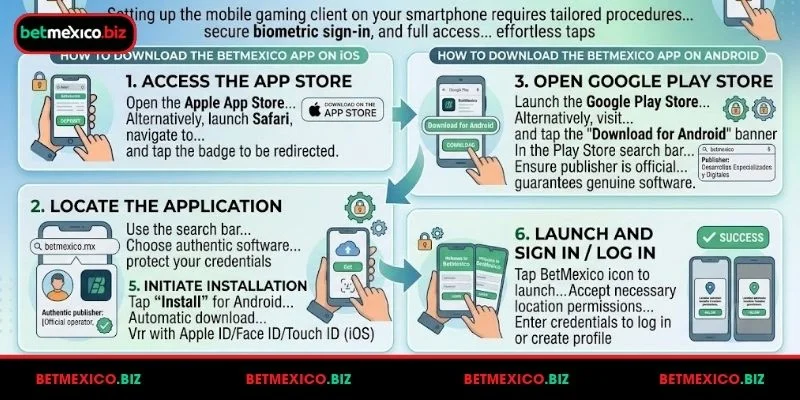
Setting up the mobile gaming client on your smartphone requires following tailored procedures depending on your device operating system. The platform delivers regular performance updates to ensure high-speed betting, secure biometric sign-in, and full access to SPEI and OXXO banking gateways. Whether you choose Apple devices or Android phones, completing the setup requires just a few effortless taps on your mobile screen.
Detailed instructions for installing the BetMexico app
How to Download the BetMexico App on iOS
Downloading the official BetMexico application on your iPhone or iPad provides a seamless, fast, and optimized sports betting and casino experience on the go. Apple users can install the native mobile software directly through the official Apple App Store or via the platform’s mobile website.
Follow these straightforward steps to set up the BetMexico iOS application on your Apple device:
- Access the App Store: Open the Apple App Store on your iOS device. Alternatively, launch Safari, navigate to the official BetMexico website, and tap the “Download on the App Store” badge located on the mobile homepage to be redirected safely.
- Locate the Application: Use the search bar inside the App Store and type “betmexico.mx”. Ensure you choose the authentic software published by the official platform operator to protect your credentials and personal data.
- Initiate Installation: Tap the “Get” or cloud icon next to the application listing. Verify the download using your Apple ID password, Touch ID, or Face ID authentication.
- Launch and Sign In: Once the installation finishes, the BetMexico icon will appear on your home screen. Tap the icon to launch the app, accept the necessary location permission prompts required for gaming compliance, and enter your credentials to log in or create a new user profile.
How to Download the BetMexico App on Android
Downloading the official BetMexico application on your Android smartphone or tablet gives you full, instant access to sports betting markets, live casino tables, and fast wallet management on the go. You can easily install the app directly via the Google Play Store or through the official mobile website.
Follow these straightforward steps to set up the BetMexico Android app:
- Open the Google Play Store: Launch the Google Play Store app on your mobile device. Alternatively, visit the official betmexico website in your mobile browser and tap the “Download for Android” banner to be redirected directly.
- Search for the App: In the Play Store search bar, type “betmexico”. Ensure the publisher is listed as the official platform operator (Desarrollos Especializados y Digitales) to guarantee you are downloading the genuine, secure software.
- Install the Application: Tap the green “Install”. The Google Play Store will automatically download and install the package onto your device.
- Launch and Log In: Once the installation finishes, tap “Open” or locate the BetMexico icon on your home screen or app drawer. Accept the required location permissions (necessary for regulatory gaming compliance in Mexico) and log in using your registered credentials.
Important Notes When Downloading the BetMexico App
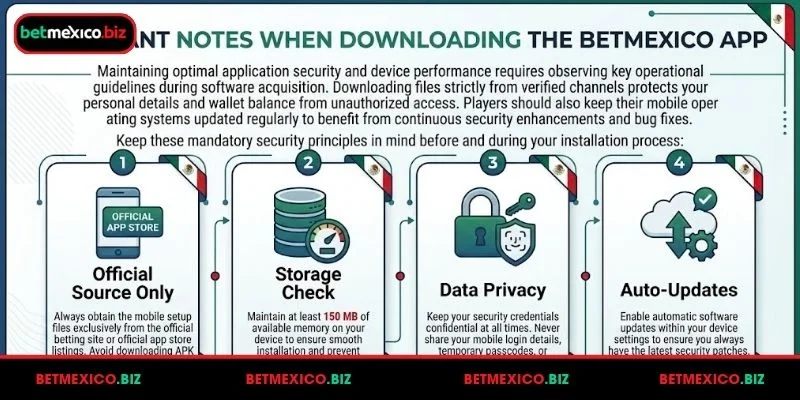
Maintaining optimal application security and device performance requires observing key operational guidelines during software acquisition. Downloading files strictly from verified channels protects your personal details and wallet balance from unauthorized access. Players should also keep their mobile operating systems updated regularly to benefit from continuous security enhancements and bug fixes.
Important notes when downloading the BetMexico app
Keep these mandatory security principles in mind before and during your installation process:
- Official Source Only: Always obtain the mobile setup files exclusively from the official betting site or official app store listings. Avoid downloading APK files or links from third-party forums or unverified websites to prevent malware risks.
- Storage Check: Maintain at least 150 MB of available memory on your device to ensure smooth installation and prevent performance slowdowns during live betting sessions.
- Data Privacy: Keep your security credentials confidential at all times. Never share your mobile login details, temporary passcodes, or biometric access permissions (such as Face ID or fingerprint data) with third parties.
- Auto-Updates: Enable automatic software updates within your device settings to ensure you always have the latest security patches, real-time sports data feeds, and improved platform features.
Common Installation Errors, How to Fix Them
Occasional installation obstacles are generally simple to resolve by adjusting basic device permissions or clearing temporary network data.
Review these effective solutions for typical mobile installation friction points:
- Installation Blocked Alert: Navigate to your Android security settings and verify that installations from unknown sources are turned on.
- Insufficient Storage Error: Delete unnecessary cached files or unused media to free up required installation space.
- Package Parsing Issue: Re-download the APK package to replace any incomplete file downloads caused by network drops.
- Unresponsive Launch Screen: Restart your smartphone and verify that your Wi-Fi or cellular network connection is stable.
Conclusion
Downloading the BetMexico App equips mobile players in Mexico with an optimized, responsive, and secure platform for sports wagers and casino gaming. Whether setting up the Android APK file or launching the iOS version, users gain instant access to live odds and rapid Mexican peso ($ MXN) cashier transfers. Always follow official download channels and verify system requirements to maintain top platform performance and account protection. Experience seamless betting on the go with BetMexico.
